Operations
Global settings (dashboard)
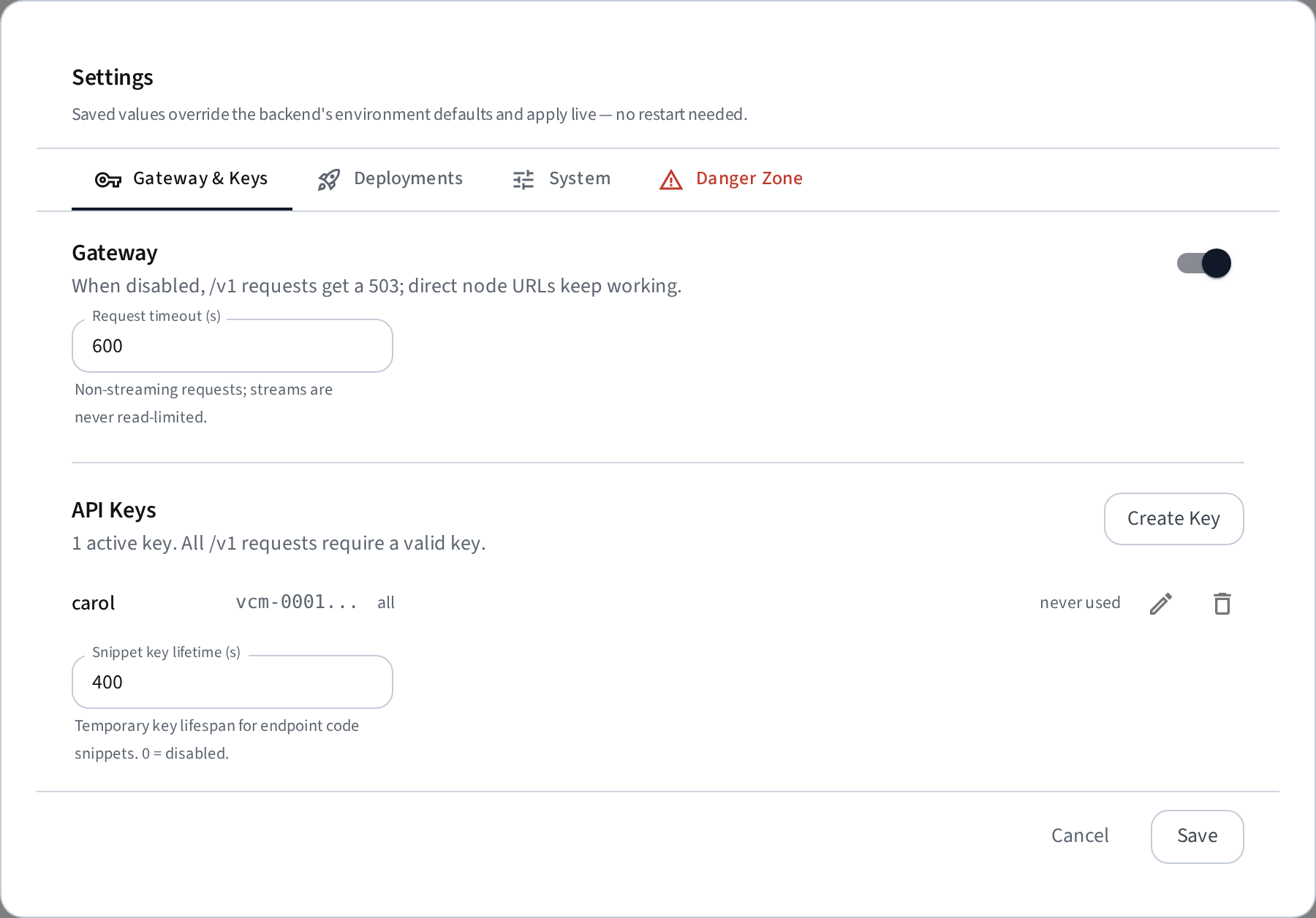
Most operational knobs live in the dashboard: gear icon → Settings. Saved values are stored in the database, override the backend's env defaults, and apply live — no restart needed. Sections:
- Gateway — enable/disable the OpenAI gateway (disabled →
/v1returns 503; direct node URLs keep working) and its request timeout. API key management (permanent and temporary keys, per-deployment scoping) also lives here — see Gateway → Authentication. - Deployments — the start-timeout watchdog, plus the deploy form's pre-filled defaults: port, GPU fraction, serve duration, vLLM version, max failed restarts.
- Notifications — webhook URL (Slack-aware) and the expiry-warning lead time.
- System — metric-history retention, warm-cache defaults (enable by default on new nodes, busy guard seconds), sync-loop intervals, and node/deployment failure thresholds.
- Danger Zone — granular purge (select any of: deployment records, nodes, metric history, saved configurations; purging nodes includes their deployments and metrics).
The env variables below remain the defaults for these settings (used until a value is saved in the UI); infrastructure values (Postgres, Consul, bind addresses) are env-only.
Configuration files
The CLI writes service-specific env files under ~/.local/share/aquila:
- host/.env (Docker compose: Postgres + discovery service)
- host/backend/.env (API service)
- host/frontend/.env (UI)
- client/.env (client agent)
If you edit any env file, restart the affected service.
Backend settings (host/backend/.env)
These act as defaults for the corresponding dashboard settings; a value saved in the UI takes precedence.
| Variable | Default | Description |
|---|---|---|
WEBHOOK_URL |
(unset) | Enable notifications. Slack incoming-webhook URLs get Slack formatting; anything else receives generic JSON. |
EXPIRY_WARNING_MINUTES |
30 |
Warn this many minutes before a deployment auto-expires. |
START_TIMEOUT_SECONDS |
1800 |
Watchdog: mark deployments errored if stuck in starting/loading this long. |
GATEWAY_TIMEOUT_SECONDS |
600 |
Read timeout for non-streaming gateway requests (streams have none). |
NODE_METRICS_RETENTION_HOURS |
48 |
How long node metric samples are kept for the history charts. |
BUSY_GUARD_SECONDS |
60 |
Seconds after a model's last request before it can be auto-evicted by the warm cache. 0 = evict immediately when idle. |
TEMP_API_KEY_TTL_SECONDS |
300 |
Lifespan (seconds) of temporary API keys auto-created for endpoint code snippets. 0 = disabled. |
Client settings (client/.env)
| Variable | Default | Description |
|---|---|---|
MODEL_DIRS |
(unset) | Comma-separated directories that may be served as local models / LoRA adapters (mounted read-only into containers). Unset = local paths rejected. |
MAX_FAILED_RESTARTS |
3 |
Crash-loop breaker: stop a deployment that restarts this many times without becoming ready. Overridable per deployment. |
HF_CACHE_DIR |
~/.local/share/aquila/models |
Host directory used as the shared HuggingFace cache. In service mode, automatically set to {runtime_dir}/models. |
VLLM_CLIENT_ROOT |
~/.vllm-client |
Root directory for deployment logs, uploaded packages, local models, and compile caches. In service mode, automatically set to the runtime directory. |
LOG_MAX_MB |
50 |
Rotate a deployment's persistent log file ({VLLM_CLIENT_ROOT}/.logs) once it exceeds this size; the overflow is kept as <file>.1. |
LOG_RETENTION_DAYS |
14 |
Delete persistent deployment log files untouched for this many days. |
PODMAN_SOCK |
(auto) | Non-standard Podman API socket path. By default the agent probes the rootless socket ($XDG_RUNTIME_DIR/podman/podman.sock) and the rootful one (/run/podman/podman.sock). |
Notifications
Set WEBHOOK_URL in the backend .env to get webhook notifications for deployment lifecycle events:
- a deployment becomes ready (with its host and port)
- a deployment enters error or unreachable (with the classified cause)
- a deployment expires soon (default 30 minutes before; extending it re-arms the warning)
- a deployment expired and was stopped
URLs containing hooks.slack.com receive Slack-formatted messages ({"text": ...}); any other URL receives a generic JSON payload (event, message, plus structured fields) for custom integrations. Notification delivery is fire-and-forget and never blocks or fails cluster operations.
Gated models (Huggingface)
Some models (for example Llama variants) require a Hugging Face access token. Provide the token via an env var when creating the deployment:
- HF_TOKEN
- HUGGING_FACE_HUB_TOKEN
Set the value to your Hugging Face access token (read access) and include quotation marks, for example:
HUGGING_FACE_HUB_TOKEN="hf_..."
You can add this in the UI under env vars or by setting it in the client environment before starting a deployment.
Firewall rules
Allow these network paths (adjust ports to your flags):
- User → Host UI: TCP
host-frontend-port(default 5173) - UI/Browser → Host API: TCP
host-backend-port(default 8000) - Clients → Host discovery port: TCP
host-discover-port(default 47528) - Host → Client agents: TCP
client-port(default 9000) - Gateway API consumers → Host: TCP
host-frontend-portorhost-backend-port(the OpenAI gateway at/v1is served by the backend and proxied by the frontend) - Direct API consumers → Client nodes: TCP on each deployment's port (only needed if you bypass the gateway)
Data persistence
Host data (deployments, nodes, metric history, saved configurations) lives in a named Postgres Docker volume and persists across host down, systemd restarts, and reboots. Deployments therefore come back with their owner, remaining serve time, and full launch configuration after a host restart.
To wipe the database intentionally:
aquila host down --purge— stop the host and delete the Postgres volume.aquila clean— full factory reset (always deletes the volume).- Dashboard → gear icon → Settings → Data → Purge — select which record categories to wipe (deployment records, nodes, metric history, saved configurations) while the host keeps running. Running models are not stopped: nodes re-register via discovery within seconds and their deployments are re-adopted automatically.
Re-adoption restores owner, lease, and launch configuration from a manifest each vLLM container carries as a Docker label (set at launch). The restored lease is the original one — extensions granted later are not preserved, and a lease that elapsed in the meantime is enforced (the deployment is stopped as expired).
To remove a single stale node instead of purging everything, open the node's Manage dialog and click Remove Node: it deletes the node, its deployment records, and its Consul registration. Running containers are not touched — an active node re-registers within seconds (and its deployments are re-adopted), while a decommissioned node disappears for good.
Note
Deployment environment variable values (e.g. HF_TOKEN) are stored on the vLLM container itself — in its Docker Env and in the launch-manifest label — and are reported by the client agent's unauthenticated LAN API during re-adoption. This is the same trust domain as the rest of the satellite API (logs, metrics); keep client ports restricted to your cluster network.
Container runtimes (Docker / Podman)
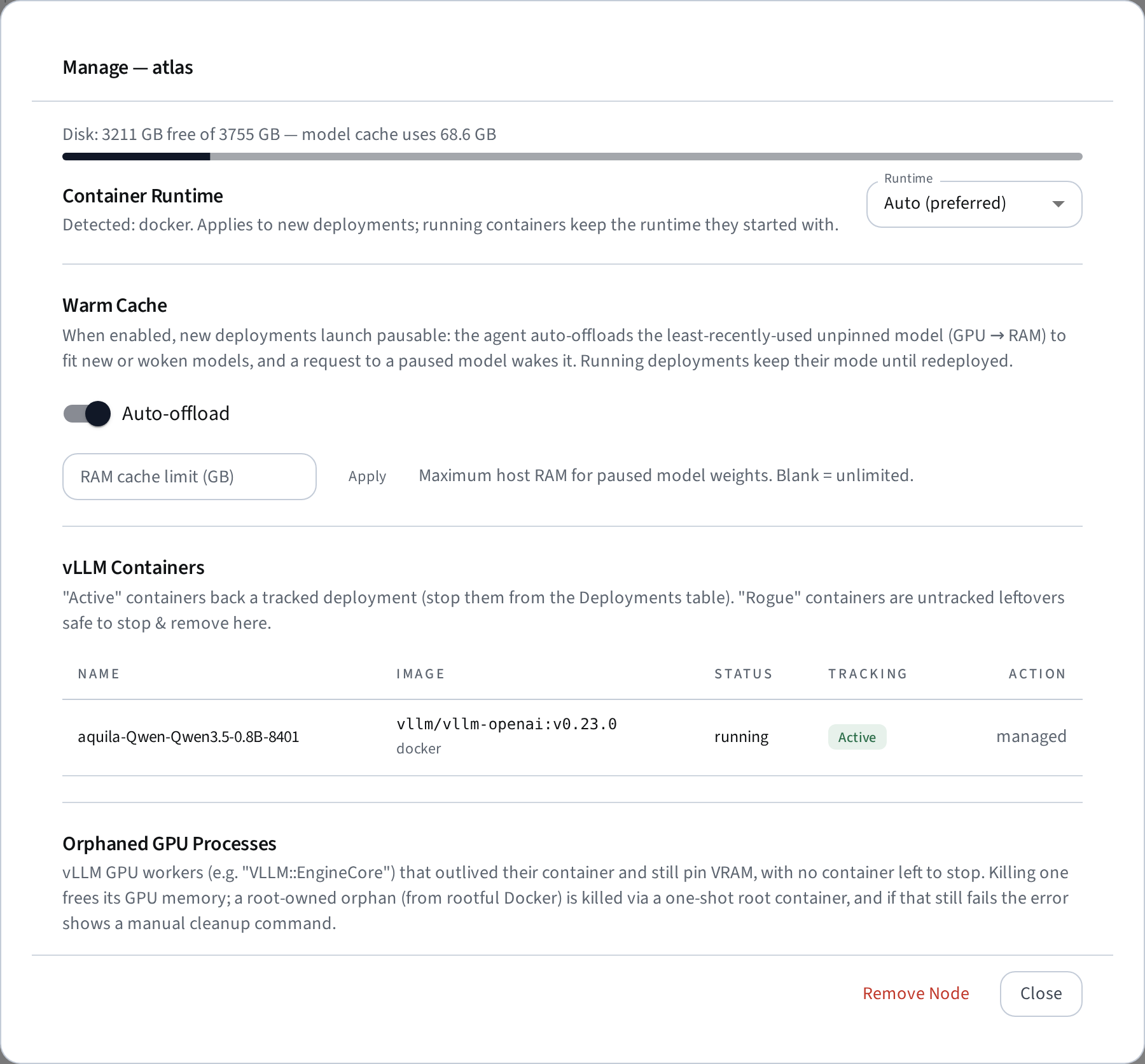
Client nodes can run deployments via Docker or Podman (Podman exposes a Docker-compatible API socket and runs the same official images — useful on clusters that disallow the Docker daemon; rootless Podman is supported). Each agent detects which runtimes are available and reports them; the node's Manage dialog shows them and lets you pick.
The runtime for a new deployment resolves as: the node's per-node override (Manage dialog → Container Runtime) → the global Preferred runtime (Settings → Deployments) → whichever single runtime exists. Running containers always keep the runtime they started with — switching a node's runtime never migrates them, and the agent manages containers in both runtimes side by side.
A reachable node with no runtime at all shows status no runtime in the node table and cannot be selected for deployments.
One image cache. Docker and Podman keep physically separate image stores, but the manager presents them as a single logical cache: the Manage dialog lists each image once (noting which runtimes hold a copy), Delete removes every copy, and when a deployment needs an image the other runtime already has, the agent copies it locally (a save→load transfer between the two API sockets, phase copying image) instead of re-downloading it from the registry. The transfer of a multi-GB image takes a few minutes — noticeably faster than a registry pull. Note that the same image can carry a different ID (and reported size) in each store — Docker's containerd image store identifies images by their registry manifest digest, Podman by the config digest — so the manager matches copies by content (layer digests), not by ID.
The host's own infrastructure (Postgres + Consul via docker compose) still requires Docker on the host machine; the Podman option applies to client GPU nodes.
Setting up Podman on a node
- Install Podman — version ≥ 5.4 required for GPU deployments. Older versions silently ignore GPU requests sent over the Docker-compatible API; the manager passes GPUs as CDI device requests, which the compat API only honors from 5.4 on. (Podman 3.x also streams no byte-level pull progress — the status chip shows
pulling imagewithout GB figures.) - Start the API socket (installing the package does not start it):
systemctl --user enable --now podman.socket. The socket is activation-based — the API service only runs while the agent talks to it; there is no persistent daemon. - Generate NVIDIA CDI specs once (and after driver updates):
sudo nvidia-ctk cdi generate --output=/etc/cdi/nvidia.yaml(ships with nvidia-container-toolkit ≥ 1.12). The agent checks both preconditions before starting a deployment and rejects it with the specific remedy when one is missing. - If the agent runs unattended (systemd service) as a user without a login session, enable lingering so user processes survive logout:
loginctl enable-linger <user>.
Rootless notes: containers run entirely as the agent's user — model files in the shared HF cache end up user-owned (no root-owned files, unlike Docker). The user needs /etc/subuid//etc/subgid ranges (one-time admin step; rootless containers won't start without them).
Podman on restricted clusters
The integration was designed for environments that disallow the Docker daemon: it is rootless, daemonless, and connects only to a socket the user owns. Site lockdowns that still need attention:
- No systemd user sessions (common on HPC compute nodes): start the API service manually next to the agent —
podman system service --time=0 unix:///path/of/your/choice &— and point the agent at it withPODMAN_SOCKin the client.env. - SELinux enforcing (RHEL-family): bind-mounted volumes (HF cache, model dirs) may hit permission denials because mounts are not relabeled (
:z). If deployments fail withPermission deniedon mounted paths despite correct ownership, checksudo ausearch -m AVC -ts recent; relabel the directories (chcon -Rt container_file_t <dir>) or run the affected dirs with a permissive policy. - User namespaces disabled kernel-wide (
user.max_user_namespaces=0): rootless Podman cannot work at all — the node will correctly reportno runtimeunless Docker or rootful Podman is permitted. - NFS home directories: rootless Podman stores images under
~/.local/share/containers, which performs poorly (or fails) on NFS. Pointgraphrootin~/.config/containers/storage.confat local scratch storage before pulling 20+ GB vLLM images.
Service management
Systemd unit names (service mode):
aquila-infra.serviceaquila-backend.serviceaquila-frontend.serviceaquila-client.service
Frontend behavior:
- host up builds a static frontend bundle and serves it with the Vite preview server.
- If you change frontend config or base path, rerun host up to rebuild.
Restart flows:
sudo systemctl restart aquila-infra.service
sudo systemctl restart aquila-backend.service
sudo systemctl restart aquila-frontend.service
sudo systemctl restart aquila-client.service
Host network setup
If the host should be reachable from other machines, use a non-loopback --host-ip (for example the host's LAN IP) and ensure firewall rules allow inbound traffic.
Reverse proxy base path
If you proxy the frontend under a path like /aquila/, pass --base-path /aquila/ when running host up. This ensures asset URLs and API/WebSocket paths resolve correctly.
Nginx needs to route four distinct path prefixes — three to the backend and one to the frontend. Below is a complete location block you can copy into your server section and adapt (replace /aquila with your chosen prefix, and adjust ports if you changed the defaults):
# --- Aquila under /aquila/ ------------------------------------------------

# Bare /aquila → redirect to trailing-slash form
location = /aquila {
    return 301 $scheme://$http_host/aquila/;
}

# REST API → backend
location /aquila/api/ {
    rewrite            ^/aquila/(.*)$ /$1 break;
    proxy_pass         http://127.0.0.1:8000;
    proxy_http_version 1.1;
    proxy_set_header   Host $host;
    proxy_set_header   X-Real-IP $remote_addr;
    proxy_set_header   X-Forwarded-For $proxy_add_x_forwarded_for;
    proxy_set_header   X-Forwarded-Proto $scheme;

    # Local-model uploads can be tens of GB — stream them.
    client_max_body_size    0;
    proxy_request_buffering off;
}

# WebSocket → backend
location /aquila/ws/ {
    rewrite            ^/aquila/(.*)$ /$1 break;
    proxy_pass         http://127.0.0.1:8000;
    proxy_http_version 1.1;
    proxy_set_header   Upgrade $http_upgrade;
    proxy_set_header   Connection "upgrade";
    proxy_set_header   Host $host;
    proxy_set_header   X-Real-IP $remote_addr;
    proxy_set_header   X-Forwarded-For $proxy_add_x_forwarded_for;
    proxy_set_header   X-Forwarded-Proto $scheme;
    proxy_read_timeout 3600s;
}

# OpenAI-compatible gateway → backend
location /aquila/v1/ {
    rewrite            ^/aquila/(.*)$ /$1 break;
    proxy_pass         http://127.0.0.1:8000;
    proxy_http_version 1.1;
    proxy_set_header   Host $host;
    proxy_set_header   X-Real-IP $remote_addr;
    proxy_set_header   X-Forwarded-For $proxy_add_x_forwarded_for;
    proxy_set_header   X-Forwarded-Proto $scheme;
    proxy_buffering    off;          # stream SSE tokens as they arrive
    proxy_read_timeout 1h;           # long generations / idle streams
}

# Frontend (catch-all) → Vite preview server
location /aquila/ {
    proxy_pass         http://127.0.0.1:5173;
    proxy_http_version 1.1;
    proxy_set_header   Upgrade $http_upgrade;
    proxy_set_header   Connection "upgrade";
    proxy_set_header   Host $host;
    proxy_set_header   X-Real-IP $remote_addr;
    proxy_set_header   X-Forwarded-For $proxy_add_x_forwarded_for;
    proxy_set_header   X-Forwarded-Proto $scheme;
}
Warning
All four location blocks are required. The three backend blocks (/api/, /ws/, /v1/) must appear before the frontend catch-all (/aquila/) because Nginx picks the longest matching prefix. If any are missing, those requests fall through to the frontend and silently fail — the gateway returns HTML instead of JSON, or the dashboard shows "Polling" instead of "Live".
vLLM images
Each deployment runs the official vllm/vllm-openai container; the requested version maps to an image tag and the image bundles its own matching CUDA runtime and PyTorch. There is no host-side CUDA detection or wheel selection — the client only needs Docker and the NVIDIA Container Toolkit. Images are pulled once and cached on the node; warm starts are instant. When extra pip packages are requested, the client builds and caches a thin derived image (FROM vllm/vllm-openai:<tag>).
You can inspect and manage cached images via the client API:
GET /images— list cached vLLM images (official + locally derived).DELETE /images/<id>— remove a specific image.
Model cache
Model weights are cached in a shared HuggingFace cache mounted into every container (host ~/.cache/huggingface by default, configurable via the client's HF_CACHE_DIR). Bind-mounting it means a model is downloaded only once per node and reused across deployments and versions.
You can inspect cached models (with per-model size) and delete unused ones from the node's manage dialog in the dashboard, or via the host API: GET /api/nodes/{id}/models/cache and DELETE /api/nodes/{id}/models/cache/{name}. The dialog also shows the node's disk usage and total cache size.
Per-deployment containers
Containers are labelled (aquila.managed=true) and started with --restart unless-stopped, so they survive a client-agent or host reboot. On startup the agent reconciles its in-memory state from the running containers, and stopping a deployment removes its container (the image stays cached).
Uploaded packages and plugins
Uploaded files (.py, .whl, .tar.gz, .zip) are stored under ~/.vllm-client/.packages/. Each upload is content-hashed to avoid duplicates.
GET /packages— list uploaded packages.DELETE /packages/<id>— remove a specific package.
Warm cache (pause & resume)
The warm cache lets the cluster keep more models ready than GPU VRAM can hold at once by pausing idle models to RAM and resuming them on demand — the first inference request after a pause transparently wakes the model (a few seconds, no re-download).
How it works
When warm cache is enabled on a node, the client agent runs a local proxy in front of each deployment. Pausing a model calls vLLM's sleep mode (cudaFree), which releases the CUDA memory allocation while keeping the model weights in CPU RAM. Resuming calls wake, which re-allocates GPU memory and restores the model — much faster than a cold start.
Enabling warm cache
Warm cache is controlled per node in the node's Manage dialog (toggle Warm offload). The global default for newly discovered nodes is set in Settings → System → Warm Cache (default_warm_offload_enabled, default on).
An optional RAM cache limit (MB) per node caps how much host RAM paused models may occupy. When the limit would be exceeded, the oldest paused model is stopped entirely rather than kept in RAM.
Auto-eviction
When a new deployment needs GPU memory on a warm-cache node, the agent automatically pauses idle models to make room:
- Models are ranked by last request time (LRU).
- A model is considered busy (and skipped) if it received a request within the last
BUSY_GUARD_SECONDS(default 0, configurable in Settings → System) or has requests currently in flight. - Pinned deployments are never auto-evicted — use the pin button on a running deployment to protect it.
- The eviction planner simulates freeing GPU memory until the new deployment fits, then executes the plan.
Manual pause and resume
Running deployments on warm-cache nodes show Pause and Resume buttons in the deployment actions:
- Pause puts the model to sleep (frees VRAM, keeps weights in RAM). A paused deployment shows status
paused_ramand remains routable through the gateway — the first request wakes it automatically. The serve-duration countdown continues while paused. - Resume explicitly wakes a paused model without waiting for a request.
- Pinned deployments cannot be paused (unpin first).
Unified memory
On unified-memory nodes (e.g. DGX Spark), GPU and CPU share the same physical memory pool. Pausing would call cudaFree but free no actual capacity, breaking the eviction chain. The pause button is therefore hidden on unified-memory nodes, and the agent rejects manual pause requests with HTTP 409.
Node maintenance mode
Maintenance mode lets you cordon GPUs on a node so they are excluded from new deployments. You can cordon individual GPUs or all GPUs at once — partial maintenance is shown as a warning badge with the specific GPU indices (e.g. maint. GPU 0, 2), while full maintenance marks the entire node.
Use the Maintenance button on a node to open the GPU selector:
- Toggle individual GPUs to cordon or uncordon them.
- Select All / Clear to quickly switch all GPUs.
- Drain (optional checkbox): stop active deployments whose GPUs overlap with the newly cordoned set.
- Cordon adds the selected GPUs to the maintenance set; Uncordon removes them.
New deployments cannot use cordoned GPUs — the deploy form's GPU selector hides them, and the API rejects launches that overlap. Existing deployments on cordoned GPUs keep running unless explicitly drained.
The API equivalent is POST /api/nodes/{id}/maintenance with {"gpu_ids": [0, 2], "enabled": true, "drain": true}.
Node metrics history
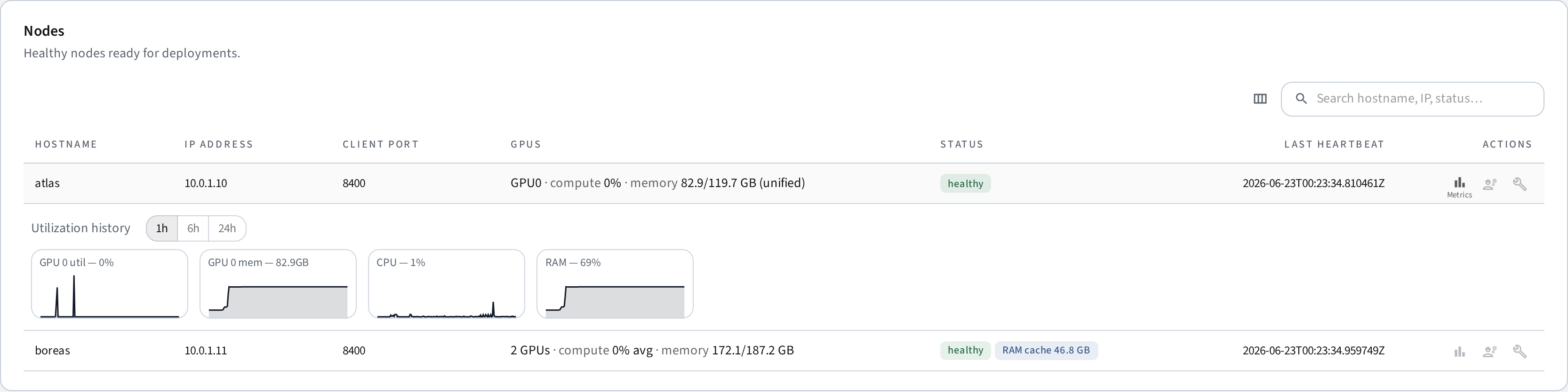
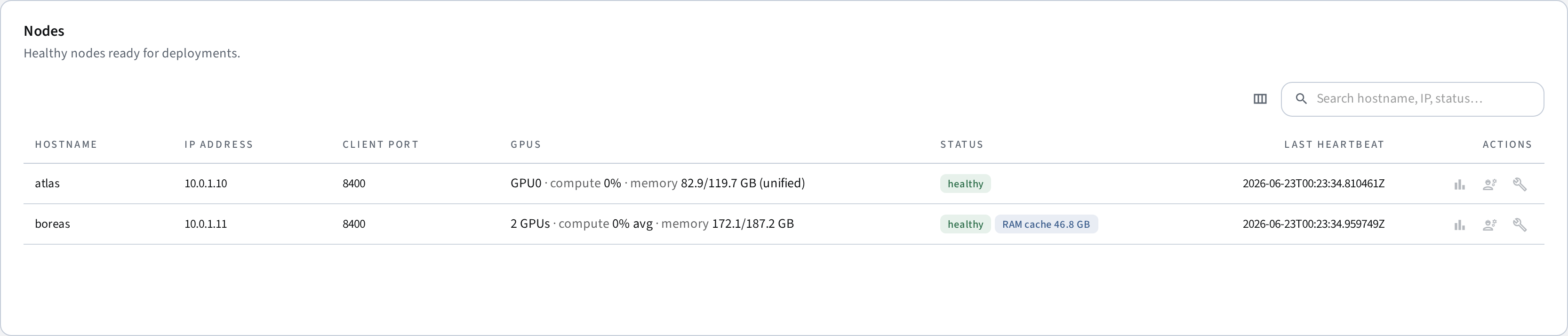
The backend samples GPU/CPU/memory/disk metrics from each node and keeps them for NODE_METRICS_RETENTION_HOURS (default 48). Expand a node row in the dashboard to see the charts; the raw data is available at GET /api/nodes/{id}/metrics/history.
On unified-memory devices (e.g. DGX Spark), the GPU's dedicated-VRAM fields aren't reported by nvidia-smi/NVML: the compute percentage is still the real GPU utilization, while the memory figures come from system RAM (the shared pool) and are marked (unified) in the node table. Compute shows n/a only when the node has no NVIDIA tooling at all. Warm cache (pause/resume) is disabled on unified-memory nodes because GPU and CPU share the same physical memory — cudaFree releases the CUDA allocation but no capacity is actually freed.
Database migrations
The backend manages its schema with Alembic and runs upgrade head automatically at startup, so upgrades never require manual migration steps. Databases created by older versions are absorbed by the baseline migration and upgraded in place. If you need to inspect or run migrations manually, the Alembic environment lives in the backend's install directory and reads the same .env as the API service.
Deployment recovery
The backend sync loop runs every 5 seconds and polls each client for its current deployments. If the backend is restarted while models are running on clients, the sync loop automatically recreates the database entries so the dashboard reflects the actual cluster state. Deployments in stopped or error state on the client are not re-imported.